Teal resume builder review (2026): is Teal+ worth it, and when does Apiva fit better?
Updated
We make Apiva. Read this knowing that.
Everything about Teal below comes from their pricing page, their terms, their help centre, their Chrome Web Store listing and their Trustpilot profile, checked on 17 October 2026. Teal puts its prices on a public page, which plenty of tools in this space don't. Have a look there before you pay either of us.
Is Teal legit?
Yes. Teal is run by Teal Labs, Inc., with a South Miami, Florida address, according to its terms. Its homepage says it's "loved by over 4 million members". On 17 October 2026 Trustpilot rated it 4.2 out of 5 from 117 reviews, labelled Great, and the Teal Chrome extension showed 4.7 from 3.2K ratings and 200,000 users.
Read the refund rules before you upgrade. Per their help centre, you have to ask for a refund within 2 days of the billing period starting on the weekly plan, 7 days on monthly and 14 on quarterly. Even then it isn't guaranteed. Cancelling doesn't refund anything by itself. It stops the next charge, and Teal+ runs to the end of the period you paid for.
The short version
Teal helps you write a better résumé and keep your search in order. It's good at that, and the free plan goes a long way. It doesn't apply for you, though. Every application is still you in the employer's portal, pressing the button.
Apiva does the applying. You approve a job, our AI fills in the form with your résumé tailored to that role, and submits it. A confirmation is saved against each one. Paid plans charge a monthly fee up front, and a credit is used only when a submission is confirmed. If an attempt stops, it shows as "Will be retried" and no credit is used. 25 applications a month are free, no card.
So if you send a handful of careful applications a week and the résumé is what worries you, Teal is the better buy. The free plan might be all you need. But if there are more jobs you'd apply to than evenings to do it in, that's what we built Apiva for, and for most people in that spot it's the better use of the money.
What Teal does well
The résumé builder is the main event. Even on the free plan you get unlimited résumés, so you can keep one for each kind of role. Paste in a job description and it highlights the keywords you're missing. Free shows you the top 5. Teal+ shows all of them, adds a match score and gives you unlimited AI writing help, cover letters included. On free you get 10 AI credits for bullets and 2 for a summary.
The tracker is free and unlimited. You save jobs from any job board with the Chrome extension, set a status, take notes and keep track of who you emailed. There's a networking CRM and an interview tracker on top.
If you apply to eight or ten jobs a week and your real problem is losing track of them, Teal sorts that out and charges you nothing.
Where Teal stops
Teal gets you ready to apply, and then you open the posting and finish the application in the employer's portal yourself. Afterwards you go back to Teal and move the job to Applied.
An earlier version of this post said Teal's extension could autofill forms. We couldn't find that on their pages this time. The extension listing now talks about saving jobs, contacts, companies and résumés, and the old autofill page redirects to the job tracker. If autofill matters to you, check inside the extension before paying for anything.
One more thing about the tracker. A row says Applied because you moved it there. If a form threw an error under the button after you'd switched tabs, Teal has no way of knowing. Only the employer's portal does.
What you get with Apiva
You approve jobs from a feed built from a corpus of 50,000+ US company career pages, rescanned on a daily cycle. Or paste the link to any US job you found yourself. Nothing goes out without your yes.
Our AI fills in the application and rewrites your résumé for that role from your real experience. You can see what changed before it's sent.
Some forms ask for something only you know. The app shows that as "Needs your answer", or "Needs a document" if it wants a file we don't have. Reply, and it carries on from there.
Every confirmed application has a saved confirmation you can open later. The status in your Applications tab comes from the thing that sent it.
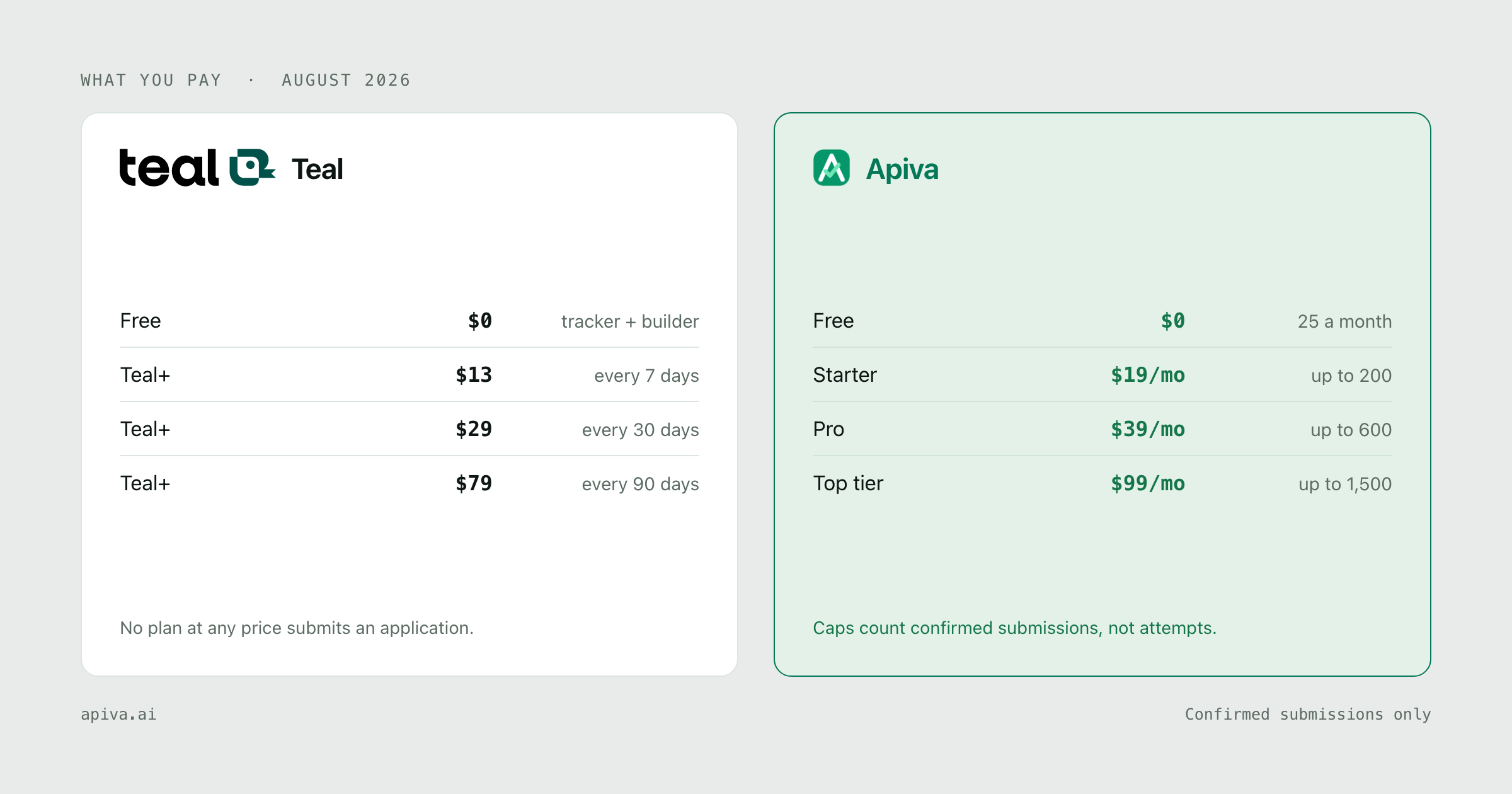
Teal pricing (checked October 2026)
From their pricing page on 17 October 2026:
| Plan | Price | Per day, as Teal shows it |
|---|---|---|
| Free Forever | $0 | |
| Teal+ | $13 every 7 days | $1.85 |
| Teal+ | $29 every 30 days | $0.96 |
| Teal+ | $79 every 90 days | $0.87 |
No card is needed to start, and every Teal+ length has the same features.
A week of Teal+ is handy if you've got one big application to get right. Left running, it's the most expensive way to buy the same thing, and it renews every 7 days until you cancel. Their FAQ is blunt about it: Teal "cannot be held responsible for recurring subscriptions if a member fails to cancel their account."
Apiva pricing
| Plan | Price | Applications a month |
|---|---|---|
| Free | $0, no card | 25 |
| Starter | $19 / month | up to 200 |
| Pro | $39 / month | up to 600 |
| Scale | $99 / month | up to 1,500 |
Tiers only differ by volume, and each one is the whole product. Quarterly prices ($49, $79 and $239) are published, but quarterly billing isn't open yet. Credits reset monthly and don't roll over. You can cancel any time and keep the plan until the end of the period you paid for. A part-used month isn't refunded. More on the pricing page.
If you use every one of the 200 Starter credits, each confirmed application comes to roughly ten cents. Teal+ buys writing tools rather than applications, so there isn't a fair way to line the two up per application.
Side by side
| Teal | Apiva | |
|---|---|---|
| Who submits | You | Our AI, on each job you approve |
| Résumé | Full builder, unlimited versions on free | Rewritten for each role, you see what changed |
| Tracker | Unlimited and free, you set each status | Applications tab with a saved confirmation per application |
| Networking CRM | Yes | No |
| How billing works | Teal+ by week, month or 90 days, renews until cancelled | Monthly fee up front; a credit is used only on a confirmed submission |
| Refunds | Ask within 2, 7 or 14 days by plan, not guaranteed | Part-used month not refunded; a held credit is released if you skip the job before it's sent |
| Free plan | Unlimited résumés and tracking | 25 applications a month, no card |
| Ratings | Trustpilot 4.2 (117); Chrome Web Store 4.7 (3.2K) | No comparable base yet |
When Teal is the better pick
You want to craft the résumé yourself. Teal gives you templates and a design mode inside a proper editor. We tailor your résumé as part of each application, which is a different job.
Your search runs on people. If most of your leads come from warm intros, the networking CRM is the useful part, and we have nothing like it.
You don't want to pay at all. Unlimited résumés and unlimited tracking with no time limit is a generous free plan.
You only need a week. $13 for seven days is a real option before one important application.
When Apiva is the better pick
If your hours go on filling in forms, that's the part we take. You approve the job and the application gets sent, with a confirmation saved when it goes through.
It's clearer when something fails. A stopped attempt is marked "Will be retried" and no credit is used, so you aren't left guessing.
On the touchy questions, like whether you need sponsorship or whether you'd disclose a disability, it goes by what you've told us. Where you haven't said, it picks the form's decline option or asks you.
You can also keep both. Teal's free tracker costs nothing to run next to us.
Bottom line
If the résumé is your weak spot, start on Teal's free plan, and upgrade only once the top-5 keyword limit gets in your way.
If applying is what's eating your evenings, try Apiva on 25 free applications a month, no card.
And if you do buy a week of Teal+, put a reminder in your phone for the next morning. The weekly refund window is 2 days, and it renews again on day seven.
Checked 17 October 2026. Spot something outdated or wrong about either service? Tell us and we'll fix it.
Teal and its logo are trademarks of Teal Labs, Inc., shown here to identify the product under comparison. We aren't affiliated with them and they haven't endorsed this.