Careerflow vs Apiva: the toolkit, or the outcome? (2026)
We make Apiva. Read this knowing that.
Everything about Careerflow here comes from their own pages, their help centre, their Chrome Web Store listing and their Trustpilot page, all read on 27 September 2026. One thing before the numbers. careerflow.ai/pricing returns a 404. The plans live on their premium page instead, behind four tabs for weekly, monthly, quarterly and yearly billing, and the page opens on yearly. Go and look at it before you pay either of us.
The 10-second version
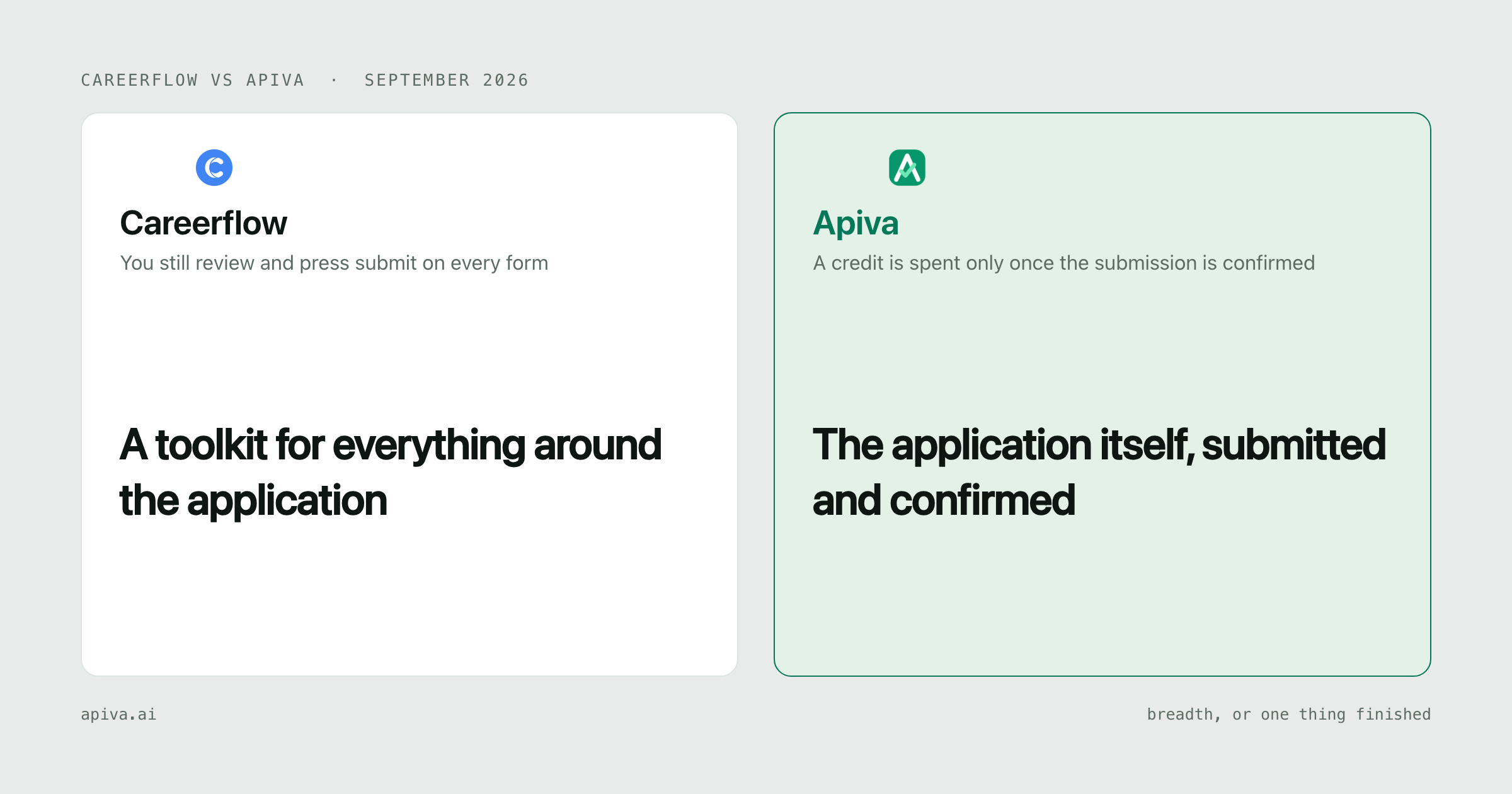
Careerflow: a big kit of job search tools. A free LinkedIn profile score, a résumé builder, a job tracker, cover letters, mock interviews, and a browser extension that fills in application forms. Premium is $23.99 a month. Nothing in it presses submit for you.
Apiva: software applies to the jobs you approve, a person finishes the forms it should not guess, and a credit is spent only once the submission is confirmed. Free tier of 25 applications a month, no card.
Want a better LinkedIn profile, sharper résumés and some interview practice, and you're fine doing the applying yourself? Them.
Want the applying off your plate, with proof each one landed? Us.
What Careerflow actually is
A lot of tools under one login. That's the pitch, and it's accurate.
The one people talk about is the LinkedIn optimizer. Their Chrome Web Store listing says it scores your profile from 0 to 100 and gives you a checklist for each section. The score is free. Having AI rewrite the profile is Premium. If your LinkedIn still has a stock headline and an empty About section, twenty minutes with this costs nothing and will probably help.
Around it sit a résumé builder, a résumé analysis pass, a skill gap score, a job tracker laid out as a Kanban board, and a networking tracker. Premium adds unlimited AI résumés and cover letters, an elevator pitch writer, a LinkedIn post writer and a job description summarizer. Premium Plus adds AI mock interviews with feedback on your answers. There is also a human résumé review sold on its own, $79 to $249 depending on seniority and back by email within three business days, per the service page.
They sell to career coaches, universities, bootcamps and outplacement firms too. One of the longer reviews on their Trustpilot page is from a coach who ran clients through it and liked being able to see where each of them was in their search. That's a real use. We don't serve it at all.
Then autofill. The extension fills application forms from the profile you saved. Their autofill page is plain about where it stops:
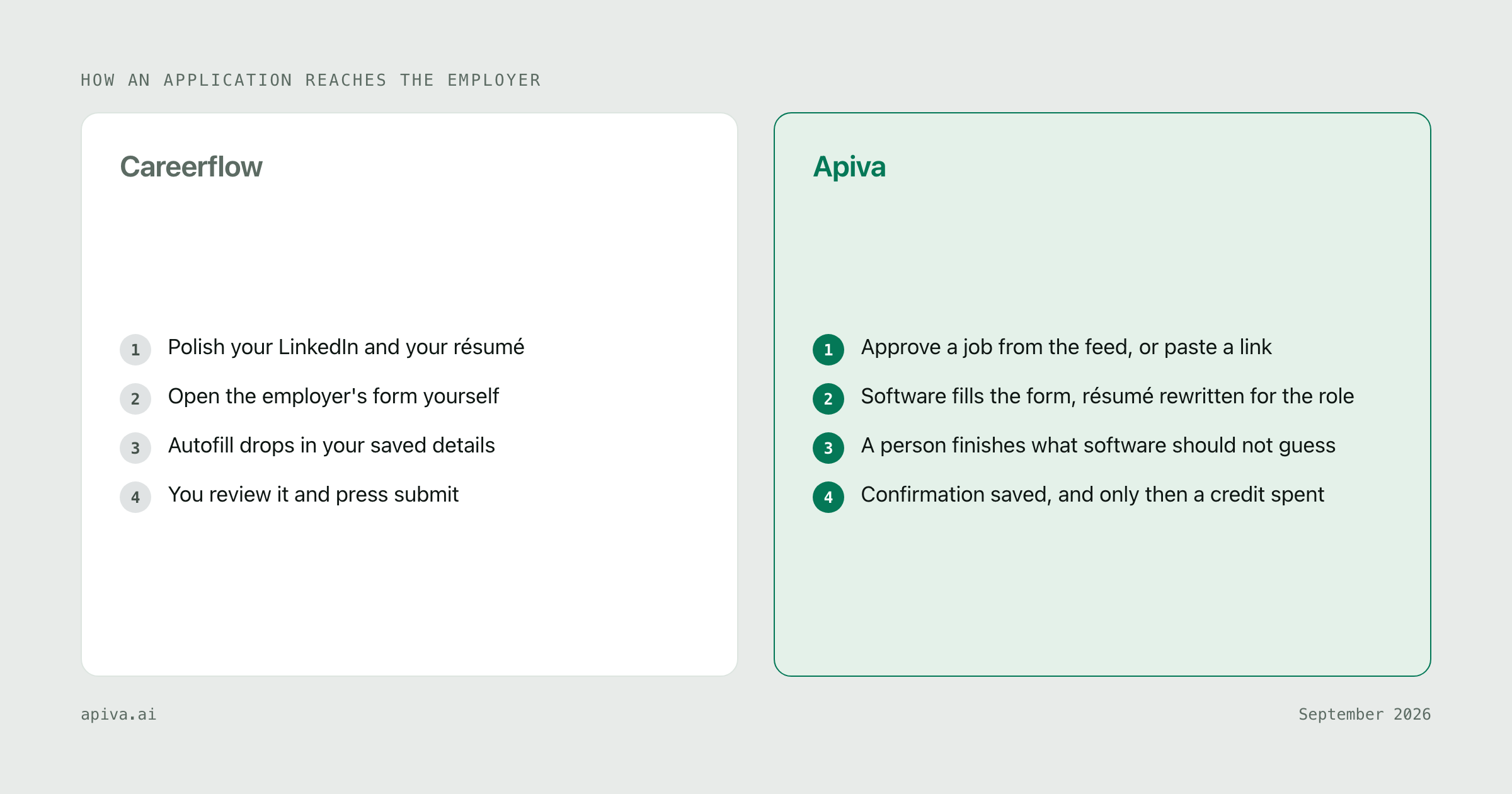
Autofill populates the form, but you review and submit. Nothing is sent without you confirming it.
The help centre article on the same feature ends the same way, telling you to review the information and submit your application. It also lists the form systems autofill works on, and that list doesn't match the one on the marketing page. If autofill is the reason you're buying, check it covers the employers you're targeting.
On Trustpilot they score 3.6 out of 5 from 17 reviews, read September 2026. That number needs a footnote. At least five of the reviews on the page come from people describing freelance data work they did for the company, not from people using the job search product, and Careerflow's own reply to one of them points this out. The Chrome Web Store figure, 4.4 out of 5 from 287 ratings, is the better read on the product itself.
Twelve features and a submit button
Count the lines Premium adds on their plan card and you get twelve. Résumés, an ATS optimizer, bullets and summaries, analysis, a keyword score, the LinkedIn rewrite, cover letters, pitches, posts, a summarizer, discounts on their services, better support.
Every one of them happens before you apply.
There's a decent case for building it that way. A better résumé helps every application you send, and a LinkedIn profile that doesn't look abandoned brings recruiters to you without you applying at all. A February 2026 reviewer on their Trustpilot page says that's exactly what happened to them.
Now look at where the hours actually go. Careerflow's autofill page says it for us: "The average job seeker spends hours a week on repetitive application forms." They're right. Their answer is to fill the fields faster and hand the form back.
What's left is the slow part. The free-text box asking why you want this particular job. A dropdown that phrases work authorisation its own way. Page two, which only appears once page one validates. Then you press submit, and their tracker logs it as applied. It knows you pressed the button. Whether the employer received anything is a separate question it can't answer.
So which product has more features is the wrong thing to compare. Careerflow wins that easily. The useful question is which part of your search is stuck. If nobody calls back on the applications you already send, better materials might fix it. If there are 150 roles you would apply to and you have evenings for twenty, a thirteenth writing tool doesn't move that number.
We've written about the neighbours already. Teal is the closest thing to Careerflow, a tracker and résumé builder with a very good free tier. Simplify is autofill first, and hands you the submit button the same way.
What Apiva actually is
You approve jobs from a feed, or paste any US job link you found yourself.
Software fills the application, with your résumé rewritten for that role, and you can review what changed before it goes anywhere. Anything your résumé can't back up gets left out, not made up.
When a form fights back, a person takes over and finishes it by hand. It pauses rather than guess, because a wrong answer submitted under your name is worse than a pause.
The credit is spent only when the submission is confirmed, and the confirmation is saved against it. An application that dies on a validation error costs you nothing, so there is nothing to refund.
What we don't do is a long list. No LinkedIn tools. No mock interviews, no networking tracker, and cover letters aren't our focus today.
Side by side
| Careerflow | Apiva | |
|---|---|---|
| Who submits | You, every one | Software, a person finishes the rest |
| Autofill | Yes, then you review and press submit | Not needed, we submit |
| Proof it landed | A tracker entry logged when you submit | Saved confirmation per submission |
| Résumé | Builder, 1 free, unlimited on Premium | Rewritten per role, you can review first |
| Free score, AI rewrite on Premium | No | |
| Interview practice | AI mock interviews on Premium Plus | No |
| When you pay | Weekly, monthly, quarterly or yearly | Only when a submission is confirmed |
| Free tier | Free forever, several tools marked "will be limited soon" | 25 applications a month, no card |
| Public rating | 4.4 from 287 on the Chrome Web Store | None yet |
The money
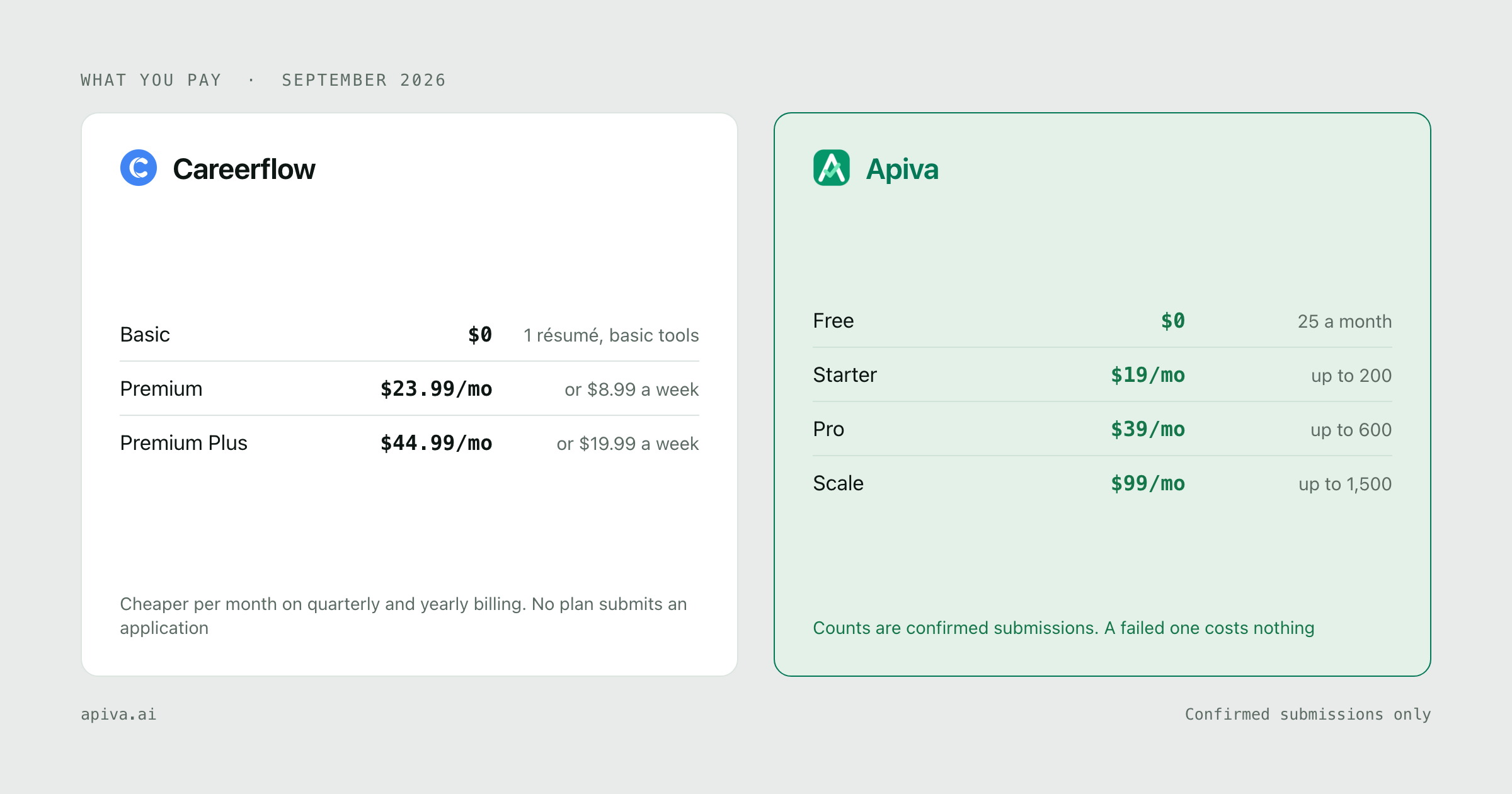
Two paid tiers, four billing periods, all from their premium page on 27 September 2026:
| Weekly | Monthly | Quarterly | Yearly | |
|---|---|---|---|---|
| Basic | Free | Free | Free | Free |
| Premium | $8.99 | $23.99 | $54.99 | $172.99 |
| Premium Plus | $19.99 | $44.99 | $119.99 | $299.99 |
On the yearly tab the page shows those as $14.41 and $24.99 a month, next to a struck-through $45.
Read the weekly column slowly. $8.99 a week sounds smaller than $23.99 a month. Over 30 days it comes to $38.53, which is about 61% more than paying monthly. Premium Plus by the week is $85.67 over 30 days against $44.99 monthly, close to double. Weekly makes sense for one intense week of prep before a single interview. Left to run, it is the most expensive way to buy the same product.
Renewals are the billing complaint that shows up on their Trustpilot page. A reviewer in March 2026 described an unexpected renewal charge and then chasing the refund. Careerflow replied that the refund was processed and that they email a reminder seven days before every renewal. Both can be true. Set your own reminder anyway.
Apiva's free tier is 25 applications a month, no card. Credits reset monthly and don't roll over. Paid plans are Starter at $19 a month for up to 200 confirmed applications, Pro at $39 for up to 600, and Scale at $99 for up to 1,500, which is 9.5 cents, 6.5 cents and 6.6 cents per confirmed application. Quarterly prices of $49, $79 and $239 are published and will be available when quarterly billing opens. The details are on our pricing page.
The obvious comparison is $23.99 against $19, and it tells you very little. Their $23.99 buys unlimited writing tools and no submissions. Our $19 buys up to 200 submissions with a confirmation on each, and zero help with LinkedIn. A cost per application only exists on one side of this, because only one side counts applications.
Where Careerflow wins
LinkedIn. A free profile score with a checklist for every section. We have nothing for LinkedIn, and if your profile is the weak spot, start there.
Breadth. Résumés, cover letters, pitches, posts, a tracker and a networking tracker, all on one $23.99 plan. For the preparation side of a search, one login covers most of it.
Interview practice. AI mock interviews with feedback, on Premium Plus. Once an interview is booked, nothing we sell helps you.
Size, and a rating to show for it. 200,000 users and 4.4 out of 5 from 287 ratings on the Chrome Web Store, listing last updated 24 September 2026. Their homepage puts it at 1.2 million job seekers. We have no public rating yet.
Coaches and schools. They sell to career coaches, universities and outplacement programmes. We sell to one job seeker at a time.
Where Apiva wins
Something submits. No Careerflow plan sends an application, on any of the four billing periods.
You pay for the outcome. A credit is spent when a submission is confirmed. The form that died on page two costs nothing.
A person on the awkward forms. When a form asks something software would likely get wrong, a human finishes it. Still one credit.
A per-application price you can actually work out. 9.5 cents at Starter. Nobody can give you that figure for a tool that doesn't count applications.
Bottom line
If your LinkedIn profile is thin, your résumé hasn't been touched in two years, or you have interviews coming up, Careerflow's free tier is worth an afternoon and Premium is a fair price for the writing tools. Pay monthly, not weekly.
If the problem is 150 jobs you'd apply to and a handful of evenings to do it in, more preparation won't fix that. That's the part we do. The first 25 applications a month are free, no card.
Whoever you use, log in to a few employers' own portals and check your applications actually arrived. It takes ten minutes.
Checked September 2026. Spot something outdated or wrong about either service? Tell us and we'll fix it.
Careerflow and its logo are trademarks of Careerflow Inc, shown here to identify the product under comparison. We aren't affiliated with them and they haven't endorsed this.